Batch Multi-Page Website Builder for Windows

Build Complete Multi-Page Websites from Templates - Automatically!

Auto Website Pro takes your content, drops it into a professional website template, generates every page - Home, About, Services, Contact, Gallery and more - then uploads the finished site directly to your domain via FTP. Use the built-in OpenAI integration to write every page automatically from a keyword, spin one project into dozens of localised variants with the location substitution tool, and batch-build an entire queue of websites overnight - each going to a different domain - without writing a single line of code.

Get Auto Website Pro - $29.95
One-time payment.
No subscription. Ever.
Windows 7 / 8 / 10 / 11
AI content generation built in
Batch build entire queues of sites
Colour, font and template randomiser
One-time purchase - no subscriptions
100% mobile-responsive output
10
Professional Website Templates Included
AI
Page Content Generation Built In
FTP
Scheduled Overnight Upload Queue
$29.95
One-Time Price - Yours Forever
Core Features

Everything You Need to Build Professional Multi-Page Websites - Automatically

Auto Website Pro is built for freelancers, small business owners, web developers, digital agencies and affiliate marketers who need to turn content into complete, multi-page, mobile-responsive websites fast - with optional AI-powered content generation, keyword and location automation, and a built-in affiliate marketing template - all without monthly SaaS fees or hours of manual coding.

Batch Website Generation

Queue multiple website projects and build them all in one batch run. Auto Website Pro processes each project in sequence - generating every page of every site automatically - so you can build 10, 20 or 50 complete websites overnight without any manual intervention.

Multi-Page Template System

Every template in Auto Website Pro includes a full pre-built page set: Home, About, Services, Contact, Gallery and Blog pages, all correctly linked in the navigation menu automatically. Choose from over 50 professional, mobile-responsive website templates spanning business, portfolio, blog, landing page and more.

Direct FTP Upload to Your Domain

Enter your FTP credentials once and Auto Website Pro uploads your complete finished website directly to your hosting server. No third-party FTP client needed. Choose your target directory, click Build & Upload, and your site is live in seconds - every page, CSS file and asset transferred automatically.

User-Defined or Auto Folder Names

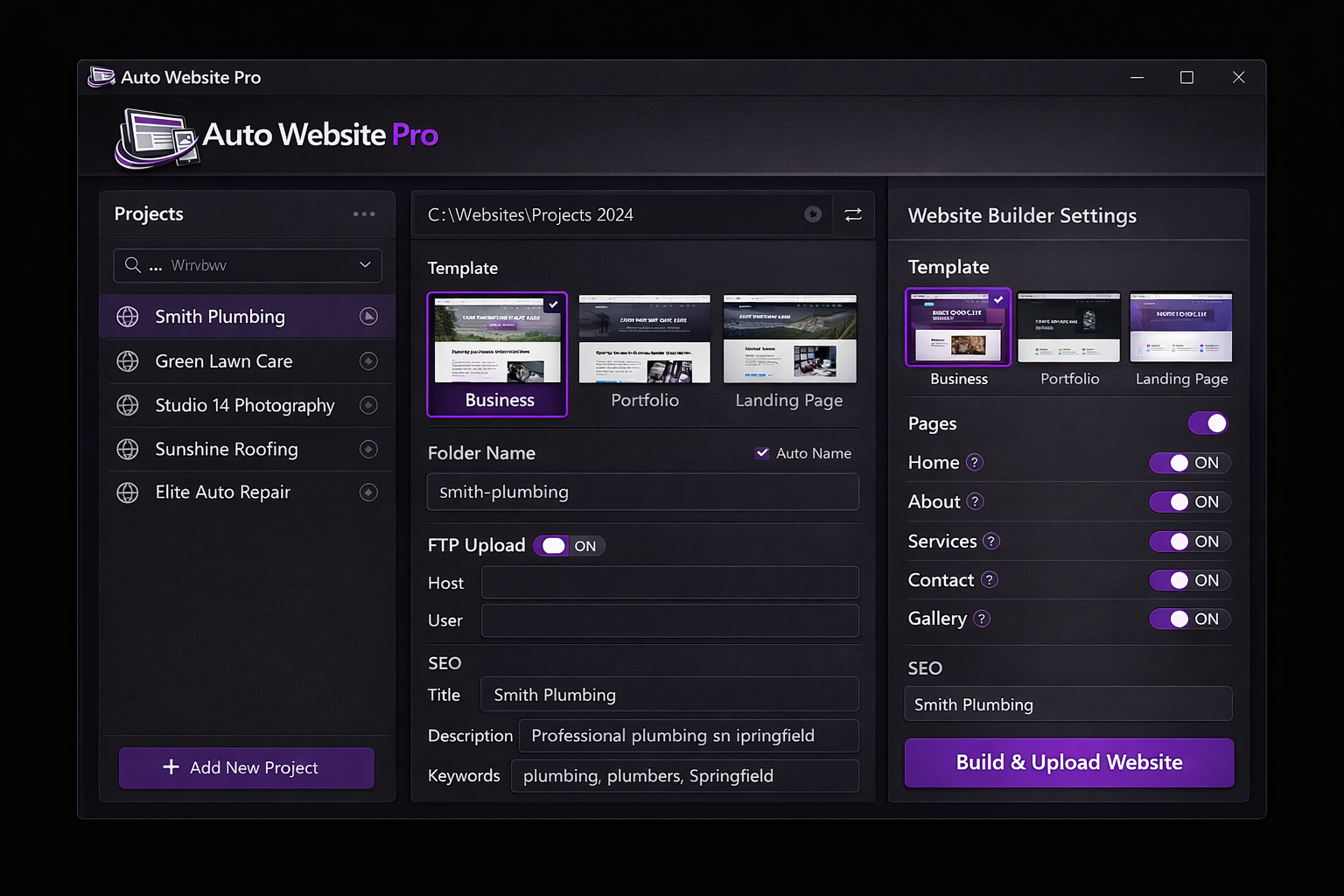
Type your own folder and sub-directory names for a clean, organised URL structure, or tick Auto Name and Auto Website Pro converts your site title into a clean, lowercase, hyphen-separated folder path automatically (e.g. "Mike's Plumbing Services" becomes "mikes-plumbing-services"). Full control over your URL architecture from day one.

Built-In SEO Tools for Every Page

Set a unique page title, meta description, keywords, Open Graph tags and canonical URL for every page in your website through Auto Website Pro's built-in SEO panel. The software writes all the correct meta tags into the generated HTML so every page on your site is search-engine ready the moment it goes live.

Mobile-Responsive HTML Output

Every website Auto Website Pro builds is fully responsive. All 50+ templates use clean CSS Grid and Flexbox layouts that adapt automatically to phones, tablets and desktops. The generated sites pass Google's Mobile-Friendly Test out of the box - no extra plugins, frameworks or post-processing required.

Visual Page Content Editor

Add text, headings, images, bullet points and links to each page of your website through Auto Website Pro's built-in visual content editor. No HTML knowledge needed - type your content, apply basic formatting, drop in your images, and Auto Website Pro writes clean, standards-compliant HTML for you automatically.

Navigation, Sitemap and Internal Linking

Auto Website Pro builds your site's navigation menu from the pages you create, adds breadcrumbs where the template supports them, generates a sitemap.xml, and cross-links related pages automatically. Every internal link uses correct relative paths so the site works identically on your local PC and on any live server.

Live Preview Before Upload

See exactly how your complete website looks in a real browser before committing to an upload. Click through every page, check every link and review the layout on desktop and mobile view. Confirm the site is exactly right before going live, then click Upload to push it directly to your domain.

AI Page Content Generation (OpenAI)

Connect your OpenAI API key and generate complete, keyword-aware page content for every page with a single click - no prompt writing needed. Run AI generation across an entire batch queue overnight, review each page in the visual editor, and regenerate anything that misses the mark. Meta title, description and keywords generated automatically too.

Keyword + Location Batch Automation

Enter a base keyword and a list of cities or regions and Auto Website Pro creates a separate, fully populated project for each combination automatically. One plumbing template becomes five localised sites in seconds, with the location substituted throughout every page title, heading, meta description and body paragraph. Pair with AI generation for a fully unattended local SEO pipeline.

Domain List Manager and Bulk Assignment

Store all your domains with their FTP credentials and niche category, then assign any domain to any project from a dropdown. Bulk-assign different domains across an entire batch queue so each site uploads to a different server automatically. Set the FTP queue timer to run overnight and your sites are live before you wake up.

Colour Scheme and Font Pairing Picker

Pick from named colour palettes and pre-tested Google Font combinations applied to any template at build time - no code editing needed. Enable random colour scheme and random font pairing modes and Auto Website Pro assigns a different palette and typeface to each site in a batch automatically, giving you a visually varied portfolio with zero design work.

RSS Import, Image Folder Import and Content Tools

Paste an RSS feed URL and Auto Website Pro pulls the latest posts as ready-to-edit blog starter content. Drop a plain text or Markdown file onto any page and headings, paragraphs and lists are converted to clean HTML automatically. Point the image folder import at a directory and images are distributed and resized across your batch sites in one step.

Build Logs, ZIP Export and Site Inventory

Every build is logged with a timestamp recording the template, domain, pages generated and upload status - exportable as CSV. Package any site as a named ZIP for client handoff, or bulk-export an entire batch queue in one go. The site inventory dashboard shows every project ever built with a quick-launch button to re-edit or rebuild.
10 Built-In Website Templates - Every Type of Site Covered

Business Website Portfolio Site Blog Landing Page Services Site Restaurant Agency Photography Real Estate Personal Site Affiliate Marketing Colour Scheme Picker Font Pairing Selector Random Template Mode Custom Template
Simple 4-Step Process

How to Build and Publish a Complete Multi-Page Website in 4 Steps

No coding. No third-party tools. No manual FTP clients. If you can fill in a form and click a button, Auto Website Pro does everything else - pages, navigation, SEO tags, sitemap and upload.

Choose a Website Template

Browse 10 responsive multi-page website templates. Preview each design and select the one that fits your project - business site, portfolio, blog, landing page, restaurant, agency and more. Each template comes with a full pre-built page set.

Build Your Pages and Content

Add your pages, write content in the visual editor, or let the OpenAI integration generate every page automatically from your keyword. Drop in an RSS feed for blog starter content, import images from a folder, or load a CSV to populate an entire batch at once. Choose your colour scheme and font pairing - or enable random mode for instant visual variety across a batch run.

Set Folder Name and Domain Settings

Type your preferred folder name or tick Auto Name to generate an SEO-friendly URL path from your site title. Enter your FTP credentials if you want Auto Website Pro to upload directly to your server. Set your SEO title and meta description for the home page.

Build, Check and Publish to Your Domain

Click Build and Auto Website Pro generates every page, runs a broken link check across all internal links, then uploads directly to your domain via FTP - or saves to a local ZIP ready for client handoff. A batch index page listing every site built in the run is generated automatically, and a full timestamped build log is ready to export as CSV.

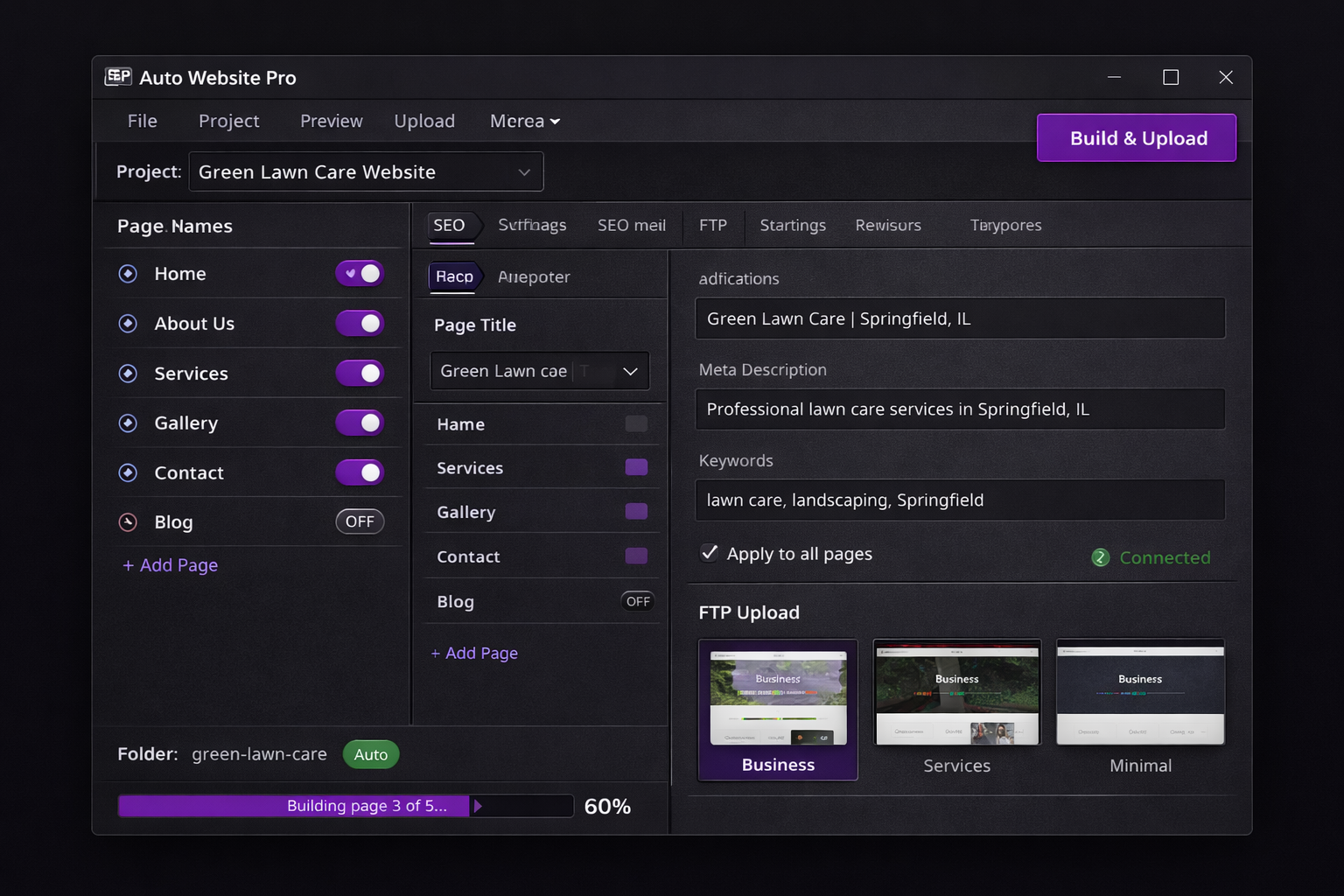
Auto Website Pro showing the multi-page builder panel with page toggles on the left, SEO fields and FTP upload settings on the right, and a Build and Upload button in the toolbar
Built for Every Workflow

One Tool. Every Website. No Monthly Fee.

Whether you are a freelance developer building client sites, a small business owner publishing your own web presence, a digital agency running batch website builds, or an affiliate marketer maintaining dozens of niche sites - Auto Website Pro handles every job from a single Windows application that runs entirely on your own PC.

  • Batch-build multiple complete websites in one overnight queue
  • Every site gets Home, About, Services, Contact and more - fully linked
  • AI content generation for every page via your OpenAI API key
  • Keyword + location automation spins one project into dozens of localised sites
  • 10+ mobile-responsive templates including a dedicated Affiliate Marketing layout
  • Colour scheme picker, font pairing selector and random mode for instant visual variety
  • Broken link checker runs automatically before every upload
  • SEO title, meta description and keywords on every single page
  • Domain list manager with bulk assignment - each site uploads to a different domain
  • Bulk ZIP export for client delivery - one ZIP per site, named automatically
  • Batch index page generator and full timestamped build log exportable as CSV
Start Building Better Websites
User Reviews

What Developers, Business Owners and Agencies Are Saying

"I build websites for local businesses as a side income and Auto Website Pro has completely changed how I work. I used to spend a full weekend setting up a five-page business site from scratch. Now I pick a template, choose a colour scheme and font pairing, drop in the client's content, set the folder name and within an hour I have a professional, mobile-responsive site uploading to their domain automatically via FTP. The bulk ZIP export means I can hand every client a download of their own site files in seconds. The built-in SEO tools mean every page is indexed correctly from day one."

James R.
Freelance Web Developer

"I needed a professional website for my landscaping company but had no web design experience and no budget for an agency. Auto Website Pro let me pick a clean business template, use the RSS import to pull some industry news content into the blog page, tick Auto Name for the folder, and have a complete multi-page website live on my own domain the same afternoon. The broken link checker flagged one image path I had got wrong before anything went live - that alone saved me an embarrassing mistake. Best $29.95 I have ever spent."

Mark S.
Small Business Owner

"We run a small digital agency and produce a lot of templated websites for small business clients. Auto Website Pro lets us queue an entire week's worth of projects, enable random colour scheme and font pairing mode so each site looks distinct, run the OpenAI content generation overnight, and wake up to a full batch of finished sites - each uploaded to its own domain, each with a ZIP package for the client and every project listed on a batch index page. We have cut production time for this type of work by around 80 percent."

Priya K.
Digital Agency Director
Pricing

One Price. Every Website. No Monthly Fee.

Pay once and own Auto Website Pro forever. Every feature included, all 50+ website templates, direct FTP upload, batch build queue and free software updates - with no subscription or per-site charges. Ever.

Best Value - One-Time Purchase
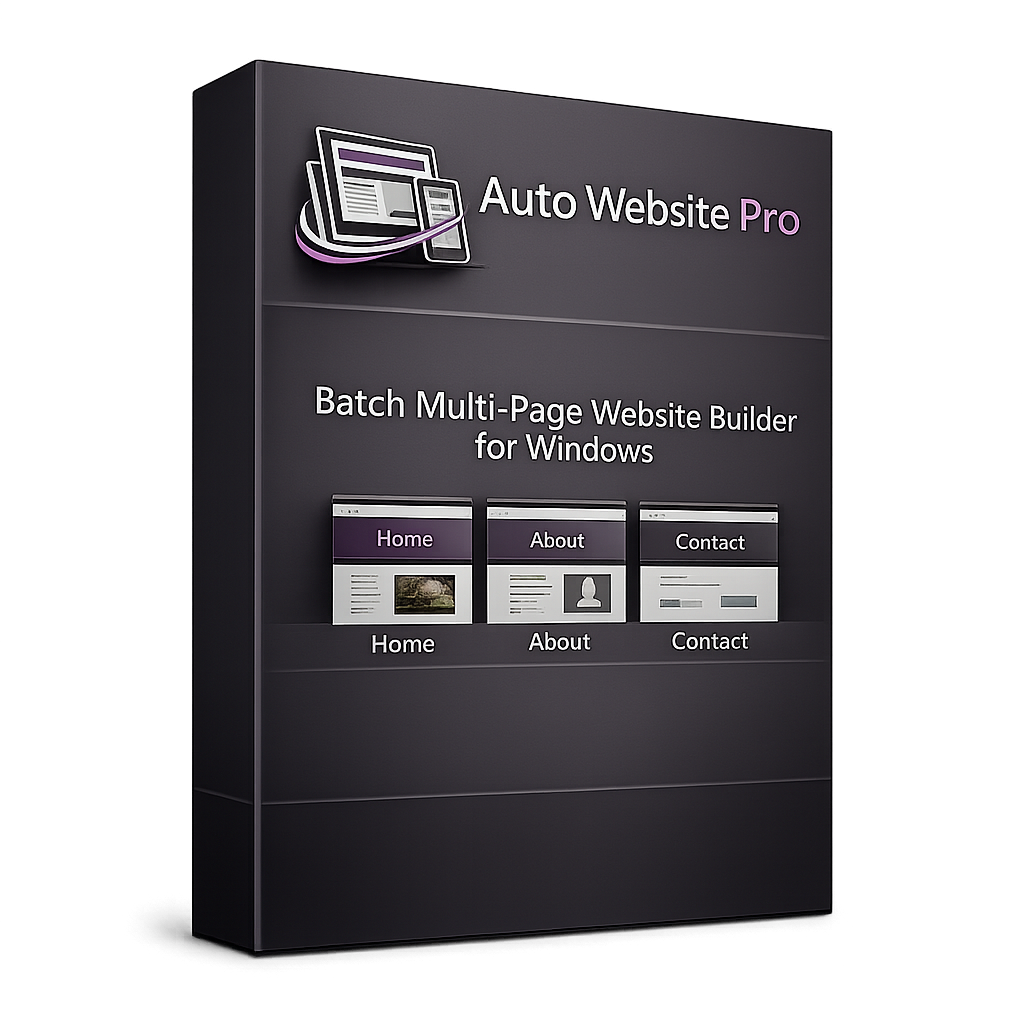
Auto Website Pro batch multi-page website builder software product box
$29.95

One-time payment - instant download after purchase

  • Batch generate complete multi-page websites from 10+ professional templates
  • AI page content generation via your OpenAI API key - batch or per-page
  • Keyword + location automation - one project becomes dozens of localised sites
  • Colour scheme picker, font pairing selector and random mode for batch visual variety
  • Direct FTP upload with domain list manager, bulk assignment and overnight queue timer
  • Affiliate Marketing template with pre-built review, rating and CTA zones
  • Broken link checker, bulk ZIP export, batch index page and CSV build log
  • Built-in SEO, sitemap.xml, canonical and Open Graph tags on every page
  • 100% mobile-responsive HTML output - free software updates included forever

Complete Your Purchase

Enter your details below and click the button to pay securely via PayPal. Your download link appears instantly after payment is confirmed.


Payment processed securely by PayPal
256-bit SSL encryption
Download link delivered instantly after payment
No subscription - one-time payment only
Free software updates included
FAQ

Common Questions About Auto Website Pro

What types of websites can Auto Website Pro build?

Auto Website Pro builds complete multi-page websites for almost any use case: business websites, professional portfolios, blogs, service pages, landing pages, restaurants, photography sites, real estate listings, agency sites and personal sites. Every template includes a full set of pages - Home, About, Services, Contact and Gallery as a minimum, with additional pages depending on the template. You can also enable or disable individual pages per project.

How does the multi-page system work?

When you select a template, Auto Website Pro loads a complete page set for that template type. You add your content to each page through the visual editor. Auto Website Pro then writes a separate, correctly named HTML file for each page, builds the navigation menu linking all pages together, generates breadcrumbs where the template supports them, and produces a sitemap.xml - all automatically. Every internal link uses relative paths so the finished site works identically on your local PC and on a live server.

How does direct FTP upload work?

In the Domain Settings panel you enter your FTP server hostname, username, password and target directory. Auto Website Pro connects to your server and uploads the complete finished website - every HTML page, CSS file, image and asset - to the directory you specify. You can upload to your web root or to any subdirectory. The software shows upload progress in real time and confirms when every file has transferred successfully.

How do user-defined and auto folder names work?

In the project settings you can type your own folder name (for example "my-plumbing-business") which Auto Website Pro uses as the local output folder name and as the sub-directory name when uploading to your server. If you tick the Auto Name option, Auto Website Pro converts your site title into a clean, lowercase, hyphen-separated folder name automatically - so "Mike's Plumbing Services" becomes "mikes-plumbing-services". This gives you clean, SEO-friendly URLs without any manual renaming.

Can I batch build multiple different websites at once?

Yes. Auto Website Pro includes a Project Queue where you can add as many website projects as you want - each with its own template, content, folder name and FTP settings. Click Build All and Auto Website Pro generates and uploads every project in the queue in sequence. Running a queue of 10 or 20 complete websites overnight is a common workflow for freelancers and agencies using the software.

Are the generated websites mobile-responsive?

Yes - every single template in Auto Website Pro generates fully mobile-responsive HTML and CSS. All layouts use CSS Grid and Flexbox that adapt automatically to any screen size from a 320px phone to a 4K desktop monitor. The generated sites include a correct viewport meta tag, fluid images and responsive navigation menus. They pass Google's Mobile-Friendly Test out of the box with no additional work needed from you.

How does the SEO system work across multiple pages?

For every page in your website you can set an individual page title, meta description and comma-separated keywords through the SEO panel in Auto Website Pro. You can also apply a base set of SEO settings to all pages with one click and then override individual pages as needed. Auto Website Pro writes these values into the correct HTML meta tags in the head section of every generated page file, and also generates Open Graph tags and a sitemap.xml so your site is fully search-engine ready from the moment it goes live.

Can I use my own custom website template?

Yes. Auto Website Pro includes a Custom Template option where you supply your own HTML template file containing placeholder tags for the page title, navigation menu, main content area, footer, meta tags and any other variable sections you want to control. Auto Website Pro substitutes your actual content into the correct placeholders and generates the complete multi-page site from your custom design. This is ideal for agencies with established design standards or developers who want pixel-perfect output from their own HTML.

Will the generated websites work on any web hosting?

Yes. Auto Website Pro generates plain HTML, CSS and optional JavaScript files with no server-side dependencies, no database requirements and no PHP or WordPress installation needed. The generated websites work on any web hosting platform - shared hosting, VPS, cloud servers, GitHub Pages, Netlify, or any service that can serve static HTML files. If your host supports FTP access, Auto Website Pro can upload directly to it from within the application.

Is this a one-time purchase or a subscription?

One-time payment of $29.95. You own the software outright with no monthly fees, annual renewals, per-site charges or per-page charges of any kind. All 50+ templates are included in the purchase price. Free software updates are included as part of your purchase for the lifetime of the product.

Does Auto Website Pro include AI content writing for website pages?

Yes. Auto Website Pro includes a built-in OpenAI integration that generates complete, keyword-aware page content for any page type - Home, About, Services, Contact, Blog and more - with a single click. You enter your OpenAI API key once in the Settings tab and it is reused automatically across all projects. The generation prompt incorporates your project keyword, target location and page type so the output is locally relevant and on-topic without any manual prompt writing. You can generate content for individual pages or enable batch content generation to write every page of every queued project automatically before the build runs. All generated content lands in the visual editor for review before the HTML is produced, and a running token usage and cost estimate is displayed in-app so you can monitor your API spend.

How does the keyword and location batch mode work?

Keyword combination batch mode lets you enter a base keyword and a list of target locations - cities, regions, countries or any other geographic modifier - and Auto Website Pro generates a separate, fully configured website project for each combination automatically. Enter "plumber" and the cities London, Manchester, Leeds and Birmingham, for example, and Auto Website Pro creates four ready-to-build projects, each with the location substituted throughout the page titles, H1 headings, meta descriptions and body content. The location spinning engine handles this substitution across every page of every generated site so each one reads as a genuinely localised website rather than a templated copy. Combine with AI content generation and bulk domain assignment to run a complete local SEO site-building pipeline from a single batch operation.

Is there a template designed specifically for affiliate marketing websites?

Yes. Auto Website Pro includes a dedicated Affiliate Marketing template with pre-built layout zones for product reviews, star rating displays, pros and cons lists, call-to-action buttons, product comparison tables, affiliate disclosure notices and banner ad slots. Every zone is ready to populate with your affiliate content straight out of the box - no custom HTML needed. The built-in banner database and affiliate link manager let you store your affiliate URLs, anchor text and tracking parameters in one place and insert them into any page or template zone with a single click. Banner rotation rules can be applied so each site in a batch run displays a different affiliate offer, and the batch index page generator can produce a master HTML index of every site built in a run - useful for managing large networks of niche affiliate sites.

Can I import content from a spreadsheet to populate a batch of sites?

Yes. Auto Website Pro includes a CSV content import feature that lets you map spreadsheet columns directly to page fields - page title, body text, image filename, meta description and more. Import a single CSV file and an entire batch of website projects is populated and ready to build in one operation. This is particularly useful for agencies building similar sites for multiple clients, for affiliate marketers maintaining large niche site portfolios, or for anyone who manages website content in a spreadsheet workflow. Combined with the batch build queue, bulk domain assignment and scheduled FTP upload timer, a CSV import can feed an end-to-end unattended pipeline that takes content from a spreadsheet all the way to live sites on multiple domains without any manual steps.

How does the scheduled FTP upload timer work?

The FTP schedule and queue timer lets you set a specific time for the upload queue to run - for example 2am - so batch builds and uploads happen automatically without you needing to be at your PC. You set up your projects, configure the queue, set the schedule time and close the lid. Auto Website Pro builds every site, generates every HTML file, and uploads each one to its assigned domain while you sleep. A timestamped build log records the template used, folder name, domain, pages generated and upload status for every project in the run, and the log is exportable as a CSV for your records. Each completed site can also be exported as a named ZIP file for client handoff or manual upload.

Can I make each site in a batch look different without designing each one manually?

Yes. Auto Website Pro includes a colour scheme picker with named palettes - Midnight Blue, Forest Green, Corporate Grey and more - that are applied to any template by substituting CSS variables at build time. A font pairing selector lets you choose from pre-tested Google Font combinations applied via a stylesheet swap. Enable random colour scheme mode and random font pairing mode independently or together and Auto Website Pro automatically assigns a different palette and typeface combination to each site in a batch run, pulling from the full library or from a user-defined subset you specify. You can also enable random template mode at the queue or project level and the app selects a different template for each site built, giving your batch of sites genuine visual variety with no manual design decisions at all.

Does Auto Website Pro check for broken links before uploading?

Yes. After building a site, Auto Website Pro runs a built-in broken link checker that crawls all internal links in the generated HTML and flags any that resolve to a missing file - before anything is uploaded. Any broken links are listed in a pre-upload report so you can fix them in the editor and rebuild before the site goes live. This quality control step runs automatically as part of the build process and applies to every project in a batch queue, so you never accidentally publish a site with a broken navigation link or missing page reference.

Can I export finished sites as ZIP files for client delivery?

Yes. Any finished site can be packaged as a named ZIP file containing all the HTML pages, CSS, images and assets - ready to hand off to a client or upload manually via any FTP client or hosting control panel. The bulk ZIP export option packages an entire batch queue as individual named ZIP files in one operation. The batch index page generator can optionally produce a master HTML index page at the end of a batch run listing every site built with its name, domain, description and template used - useful for managing large client deliveries, niche site portfolios or internal link networks. The index page can be saved locally, uploaded to a chosen domain via FTP, or included in the ZIP export.

How do I receive the software after paying?

The moment your PayPal payment is confirmed you are redirected back to this page where your download link appears immediately. You can be installing Auto Website Pro and building your first complete multi-page website within minutes of completing your purchase. No waiting for an email, no account setup required.

Stop Building Websites Page by Page

Join thousands of freelancers, business owners, digital agencies and affiliate marketers already using Auto Website Pro to build professional, SEO-ready, mobile-responsive multi-page websites automatically - with AI content generation, keyword and location batch automation, colour and font randomisation, direct FTP publishing to multiple domains, and bulk ZIP export for client delivery - without writing a single line of code or paying a monthly subscription.

Get Auto Website Pro - Only $29.95

Secure PayPal  |  Instant download  |  No subscription  |  Free updates